Open topic with navigation
Pulse Building
Importing Settings from a CSV File
In the Pulse Building application, you can import the following settings from Comma-Separated Values (CSV) files:
Pulse Types - The Import option is applicable for the following pulse types.
Modulation Settings - The Import option is applicable for the following modulation types.
-
Custom BPSK
-
Custom QPSK
-
FM Step
-
AM Step
-
Custom Phase Pattern
-
Custom FM Chirp
Hop Patterns - The Import option is applicable for the following Hop pattern type.
Antenna Pattern - The Import option is applicable for the following Antenna pattern type.
PRI Pattern - The Import option is applicable for the following PRI pattern type.
To import settings from a CSV file
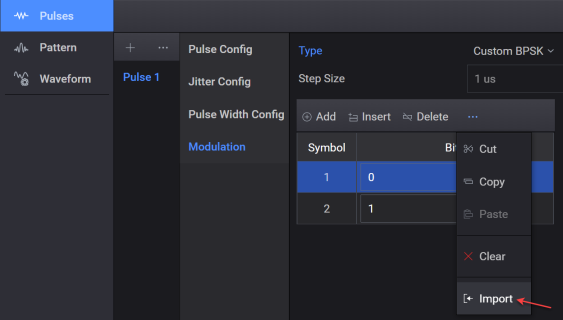
This procedure uses the example of importing modulation settings. Similarly, you can import other settings from a CSV file.
-
Got to Pulses > Modulation tab.
-
Select a Modulation Type that supports importing settings from a CSV file.
-
Click the  button to display the menu for configuring modulation settings.
-
Click the Import option from the displayed menu.
-
Navigate to your modulation settings csv file and click Select.
See Also